The Future Of PC Gaming

There are lot of gadgets introduced at CES 2011 and still announced, but the most ....

Battlefield 3 vs Modern Warfare 3

This fall, Battlefield 3 and Call of Duty: Modern Warfare 3 come out within weeks of each other, ...

Moonsoon, Foot Frezy!

Come monsoon season and everybody has to rake their brains...

Why did the chicken cross the road?

Lorem Ipsum is simply dummy text of the printing and typesetting industry. Lorem Ipsum has been the industry's standard dummy text ever since the 1500s, when an unknown ...

Showing posts with label Tech News. Show all posts

Having Problems In Attaching Files To Gmail ? Here's A Solution

Google Mail or we better know It As Gmail Has Some Glitches . Just because They Changed Up gmail From "http" To "https" protocol many people are facing problems while attaching a document.

I Myself Got troubled by this Problem And Found Out A Simple Solution That Was to Change It Back To "
"http"

The Following Steps Guide You How to Change Google Back to "http"

Many of you Will be getting an Error Of this Kind :-
To disable or re-enable this feature in Gmail:
  1. Sign in to Gmail.
  2. Click the gear icon in the upper-right corner, and select Mail settings.
  3. In the General tab, set 'Browser Connection' to 'Always use https' or 'Don't always use https.'
    If you've never changed the setting before, no radio buttons will be selected, even though the default is indeed 'Always use https'.
  4. Click Save Changes.
  5. Manually change the URL to http://mail.google.com to start accessing Gmail via http.

Please note that selecting 'Always use https' will prevent you from accessing Gmail via HTTP (Hypertext Transfer Protocol). If you trust the security of your network, you can turn this feature off at any time.


How To : Facebook Timeline


Please note: If you haven’t already verified your Facebook account with either a mobile phone number or credit card number, you’ll be asked to do so before you can try the new features. If you need more help with that,here’s a helpful link.
First, you’ll need to go to the Facebook developer page, which is a part of your Facebook account. Make sure you’re logged into your Facebook account, and then simply follow this link to get started.


Step 3

3. Name it whatever you want, and give it whatever namespace you'd like -- it doesn't matter. Click the checkbox "I agree to the platform privacy policy." And then click Continue, pass the security check by filling in the Captcha, and you'll be ready for the next step.


Step 4

4. After you've verified yourself as a human, you'll reach this screen, where you'll need to click "Open Graph" on the left side.

Step 5

5. You'll see the next screen, entitled "Get Started with Open Graph" -- fill in anything you want (it doesn't matter) in those fields under the heading "start by defining one action than one object for your app." Click Get Started.


Step 6

6. On this screen, do nothing except scroll to the bottom and click "Save Changes and Next." Do the same thing on the next screen.


Step 7

7. You'll be taken to this screen. Wait a few minutes, and then go to your Facebook homepage. That's where you'll be invited to enable Timeline. Be patient at this point -- sometimes it requires you to wait before the changes take effect.


Step 8

8. When you go back to your Facebook homepage, you'll see this. Success! Click Get It Now, and you're in!


 You've Done It!

Here's where you fiddle with your timeline, set it up the way you like it, and when you click Publish Now, your Timeline goes live. Or, you can wait until Thursday, September 29, 2011, and it'll go live on its own. If you want to get into your timeline from another computer, the address for this developer's version is located at this URL: http://www.facebook.com/[yourusername]?sk=timeline and of course [yourusername] is your own Facebook user name.


Future Of PC Gaming


RAZER SWITCHBLADE(MINI)


There are lot of gadgets introduced at CES 2011 and still announced, but the most amazing and revolutionary gadget on CES 2011 is and will be Razer Switchblade Gaming PC by Razer. The 7 inch multi touch screen, the keyboard which modify itself for the control of the game running on it.


The Razer Switchblade is a little smaller--and a lot more powerful--than a netbook, programmable keyboard. Razer was loathe to discuss too many details, as the Switchblade is still a concept prototype, but we did find out that the gaming machine is powered by an unreleased Intel Atom processor and runs the Windows 7 operating system with a custom Razer UI.


It is capable of playing games and video at 30 frames per second. Other tentative specs include a 128GB SSD, Wi-Fi, 3G, a mini HDMI-output, and a USB 3.0 port, though these may change when the product goes to market. The Switchblade in its current form will give gamers about 4-6 hours of intensive gameplay. Switchblade also has a built-in webcam.


Specs for Razor Switchblade
  • Processor: Intel Atom
  • Size: 172mm x 115mm x 25 mm
  • OS: Windows 7
  • Ports: MINI HDMI, USB3.0, Standard Headphone and Mic ports
  • Communication: Wifi and 3G enabled


Q: When and where can I buy the Razer Switchblade?
A: The Razer Switchblade is a concept design (think of it like a concept car) and will not be made available for purchase - yet. Razer will be working with selected partners to design and launch products based off the Razer™ Switchblade concept design. We will be announcing more information shortly so sign up on the registration page to get the news first.


The Razer Blade 


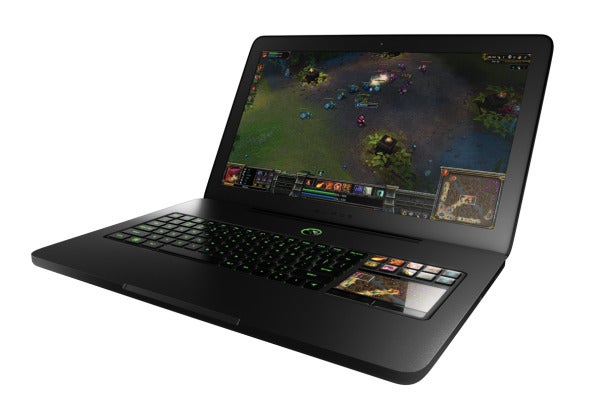
Razer has just announced its biggest product yet: the Blade. CEO Min-Liang Tan bills it as the first “true” gaming laptop (rather than desktop replacement), and, on paper, it looks to be one of the most well-rounded laptops today.

The internals, too, are impressive: a 2.8GHz Intel Core i7-2640M CPU, GeForce GT555M GPU with 2GB of dedicated video memory, and 8GB of DDR3 RAM. Although they're mobile chips, and as such not quite as powerful as the desktop components


What really sets the Razer Blade apart from any other laptop is the Switchblade User Interface. The interface is comprised of 10 dynamic adaptive tactile keys for easier access of in-game commands, and an LCD capable of two modes: one mode that displays in-game information when a mouse is in use; and another mode that functions as an ultra-sensitive, multi-touch panel designed for gaming on the go.


Product Specifications:
  • 2.8GHz Intel® Core™ i7 2640M Processor
  • 8GB 1333MHz DDR3 Memory
  • 17.3" LED Backlit Display (1920x1080)
  • NVIDIA GeForce® GT 555M with NVIDIA® Optimus™ Technology
    2GB Dedicated GDDR5 Video Memory
  • Built-in HD Webcam
  • Integrated 60Wh Battery
  • 320GB 7200rpm SATA HDD
  • Wireless Network 802.11 b/g/n Compatible
  • 16.81" (Width) x 10.9" (Depth) x 0.88" (Height); 6.97lbs (Weight)


PRICE : $2799, Rs.1,20,000


Counter Strike : Global Offensive


The famous FPS multi-player, Counter Strike is about get a new expansion sometime in early 2012. Valve has announced it as GS: GO, short for Counter-Strike: Global Offensive which will be available for PCs, Macs, PS3 and XBOX 360. This upcoming expansion is developed in cooperation with Hidden Path Entertainment.
According to Valve, this new update will bring new maps, characters, weapons and great new improvements on classic maps. Let us hope that this new update does not disappoint gamers and make this multi-player must-play even more interesting.
For more information, please visit the CS: GO Steam page


Get Rid Of Facebook Sidebar Chat!


RECOMMENDED METHOD:

If you havent already installed Google Chrome, download

Google Chrome Here

after you have downloaded and installed Google Chrome, download

this script

allow it to download (continue) and then finally click Install. After that Restart your browser(Close it and open it again) 

You are done :)


For Safari:

Install

Greasemonkey

if you havent already got it installed. Then install

this script


You're done! Now restart your browser, go to facebook.com again, and see that you have the old chat, if it doesn't work then you done it wrong!


For Internet Explorer:


Install

Trixie

if you havent already got it installed. Then install

this script


You're done! Now restart your browser, go to facebook.com again, and see that you have the old chat, if it doesn't work then you done it wrong!


For Mozilla Firefox

Install this addon,

Greasemonkey

if you havent already got it installed. Then install

this script


You're done! Now restart your browser, go to facebook.com again, and see that you have the old chat, if it doesn't work then you done it wrong!


For Google Chrome:

Install

this script


You're done! Now restart your browser, go to facebook.com again, and see that you have the old chat, if it doesn't work then you done it wrong!


For Opera:

Follow

this guide

on how to install

this script


You're done! Now restart your browser, go to facebook.com again, and see that you have the old chat, if it doesn't work then you done it wrong!


The "See More" Prank

People Have Found Out new ways to trouble people on Facebook.The Most popular now-a-days is the see more prank.People go to other people's walls and type something important and at the end they tag a page named "see more" which looks much similar to that of the see more button of Facebook.


When people click that "see more" They are re-directed to that page which was tagged as "see more".Making the other person annoyed totally!!

SO JUST DON'T CLICK ANY "SEE MORE" BUTTON IF YOU DONT WANNA GET FOOLED AGAIN!!

Facebook Launches Skype-Powered Video Calling


Confirming our report last week, Facebook has just announced a major new feature that it’s launching in tandem with Skype: video calling.
It’s a feature that’s been rumored for quite a while, and it’s one that Facebook is putting a lot of weight behind. Now, whenever you browse to a friend’s profile, you’ll see a new button nestled between the ‘Message’ and ‘Poke’ buttons that says ‘Call’. Click that, the other user will see a popup asking if they want to accept a call, and you’ll be immediately connected (you’ll need to install a small plugin the first time you use the service).
You’ll also see video calling integrated into Facebook’s Chat product. Really, you can’t miss it — Facebook is launching a new chat sidebar today that by default it takes the entire right side of the screen, and the first time you click on any user you’ll see a prompt asking if you’d like to make your first video call. If you try to initiate a video call and the other user doesn’t respond, you’ll be prompted to send them a video message.
So why is this a big deal? Facebook emphasized the fact that users will not have to create new Skype accounts to make calls, and that this will allow users to call their friends and family with a very minimal amount of setup (the flow for installing the applet only took a few seconds).
Of course, this comes just a week after the launch of Google+, which includes a video chat feature called ‘Hangouts’. Facebook’s video chat doesn’t support group chats yet, but when asked if Facebook will be rolling out group video calling, Zuckerberg said not to rule anything out. He added that one-to-one calling makes up the vast majority of video calling.
Skype CEO Tony Bates took the stage to make a few comments. One important thing he noted: Skype is talking with Facebook about having some paid products available through the web format.
Update: Facebook engineer Philip Su has just published some notes on how the team built the feature.
He writes that Facebook is using different techniques to install the Skype plugin depending on what browser you’re using to help streamline the experience:
Installation Flows for Each Browser and OS
To make installation as easy as possible, we specifically customized the installation flow for each OS and browser combination. For instance, on Mac browsers with Java enabled, the installer is hosted entirely within the browser so that no additional clicks are required. We use a small bootstrap EXE in Windows browsers to minimize the initial download time and to manage installation permissions as seamlessly as possible. We also put the entire installation flow inline with the feature itself, instead of requiring a separate download and installation page, so that your call automatically continues once installation completes.
Also very cool: Facebook users are using Skype’s service anonymously.
Protecting User Identity
To ensure that you can make a call without needing a separate Skype account, Facebook connects to Skype’s secure REST APIs using encrypted user IDs to set up the necessary credentials. This opens up the possibility of video calling to users who might never have used Skype before, and makes the overall calling experience much simpler for everyone. While it would have been easier to give user IDs directly to Skype, we instead went to great lengths to make sure users are protected and anonymous on Skype’s service.
So Try It NOW!
http://www.facebook.com/videocalling

British Teenager Detained Over Cyber Hacking !


A suspected British computer hacker was being held on Thursday for questioning about cyber attacks

against a British law enforcement agency and two music industry bodies.

Ryan Cleary, 19, was charged on Wednesday with five offences under the Criminal Law Act and Computer Misuse Act after he was arrested as part of a joint investigation between London police and the U.S. FBI into recent attacks on high-profile websites.

He is accused of attacking the website of Britain's Serious Organised Crime Agency (SOCA) and sites owned by the British Phonographic Industry and the International Federation of the Phonographic Industry.

Cleary appeared briefly at Westminster Magistrates' court in London on Thursday and was remanded into police custody for up to three days for more questioning.

The attack on SOCA was one of a number of recent incidents claimed by the Lulz Security (LulzSec) group of hackers, which says it has also targeted the U.S. Central Intelligence Agency (CIA) and Sony Corp.

LulzSec has denied Cleary belongs to the group which often uses so-called denial-of-service attacks to overwhelm websites with internet traffic.

Its members are believed to be scattered around the world collaborating via secret chatrooms.

Security experts say the group emerged from Anonymous, a hacker activist group which became well-known for targeting companies and institutions that opposed Wikileaks and its founder Julian Assange.


Skype launches video calling for Android phones!

The company whose name became synonymous with Internet calling in the mid-2000s said its updated Android app would initially support video calling on selected HTC (2498.TW) and Sony Ericsson (6758.T)(ERICb.ST) Phones, with more to follow soon.

"We are committed to bringing Skype video calling to as many platforms as possible," Skype's product and marketing chief Neil Stevens said in a statement.

The move will help makers of phones based on Google's (GOOG.O) Android software compete with Apple's (AAPL.O) FaceTime video-calling service launched last year for the iPhone and now available on its iPad 2 tablet and Mac computers.

Video calling could also help new Skype owner Microsoft (MSFT.O) promote its Windows Phone smartphone platform, which it is merging with Nokia's (NOK1V.HE) in an effort to become competitive with Android and Apple.

Skype had an average of 145 million connected users per month in the fourth quarter of 2010. Together, they made 207 billion minutes of calls in 2010, about 42 percent of which was video calls.

Mobile video calling is in its infancy, but the fixed-line Internet calling market grew 12.6 percent to $17.3 billion last year, according to UK-based telecoms research firm Point Topic.

With the new Android Skype app, users will be able to make free one-to-one video calls between Android phones, iPhones, Mac computers, Microsoft Windows PCs and televisions.

The first Android handsets to support Skype video calling are the HTC Desire 5,Sony Ericsson Xperia neo, Sony Ericsson Xperia pro and the Google Nexus S.